Practice for the Kenexa Prove It Excel test
Hands-on tasks in a simulated Excel window, Normal User level.
We are not affiliated with Kenexa Prove It. Our practice replicates the test's format, not its content.
Our mock
| Mock | Items | Type | Timer | Scoring |
|---|---|---|---|---|
| Normal User style | 30 | Hands-on tasks | None; pace recorded | Correct or incorrect per task, time per task shown |
What this test usually is
Prove It is a skills-testing product from IBM Kenexa; the Excel tests are listed in SHL’s catalog of IBM Kenexa assessments. SHL describes the Excel 2010 Normal User test as one for clerical-level users who edit, develop and create workbooks: building a basic workbook, formatting cells, navigating the application, using formulas, and changing the overall look of the spreadsheet. SHL’s page does not state how many tasks there are or whether the test is timed, so ask whoever sends you the link.
Candidates commonly report that staffing agencies send these links and that the Excel version is a simulated spreadsheet where you do things (format this range, total that column, sort this list) rather than choose answers. We cannot confirm that from SHL’s page, so treat it as reported, not guaranteed. Levels above Normal User exist, according to candidate reports; our mock covers the Normal User skills only.
Because the work is hands-on, the habits that cost points are small ones. Clicking the wrong cell before typing. Pressing Escape instead of Enter. Using a menu path the simulation does not accept. A practice grid can fix those.
How to prepare
- Take the free 5-task sampler first. It shows which skill areas are weak before you spend any time.
- If you missed anything in formatting or sorting, do the matching lessons in Excel from Zero. They are free.
- Take a full mock. Look at time per task, not just the score. A task that took you three minutes is a task you half know.
- Retake the mock a day later. The items change; the skills do not.
What our mock does and does not do
Our mock is our own design for practicing these skills: 30 hands-on tasks, one at a time, checked automatically, with your pace recorded and no time limit. The task count, the untimed setting and the mix of skills are our choices, informed by the public description above; they are not a copy of the real test. Every task is written by us and none of it comes from the real test. We checked the public description on November 8, 2026.
Skills to practice
- SUM Totals a column or block. AutoSum (Alt+=) writes the SUM for the range it guesses, which is the run of numbers above or to the left, so read the outline Excel draws before you press Enter.
- AVERAGE Ignores empty cells and text but counts zeros, so a blank score and a 0 give different averages.
- IF Labels a row from a test, for example Pass at 60 or more. Text results go inside quotation marks and numbers do not.
- COUNTIF Counts the cells that meet one condition. A condition with an operator, such as ">50", goes in quotation marks.
- SUMIF Adds one column where another column matches a label, such as the total of every Travel row.
2 sample items with answers
1. Find the average of five test scores.
| A | B | C | D | |
|---|---|---|---|---|
| 1 | Name | Score | ||
| 2 | Ana | 82 | 67.4 | |
| 3 | Ben | 59 | ||
| 4 | Chloe | 60 | ||
| 5 | Dev | 91 | ||
| 6 | Elena | 45 |
AVERAGE adds the five scores in B2:B6 and divides by five: 337 divided by 5 is 67.4. If one score were left blank, AVERAGE would divide by four instead of five.
2. Show the cost of 12 pens at 1.50 each, less a 10% discount, as currency.
| A | B | C | D | |
|---|---|---|---|---|
| 1 | Item | Qty | Price | |
| 2 | Pens | 12 | 1.5 | $16.20 |
12 times 1.50 is 18, and 18 times 0.9 is 16.2. The currency format only changes how 16.2 is displayed, so the cell shows $16.20 and still holds 16.2.
Free sampler
Five items in this format, scored like the full mock, with a skill-by-skill report at the end. No account needed.
Start the sampler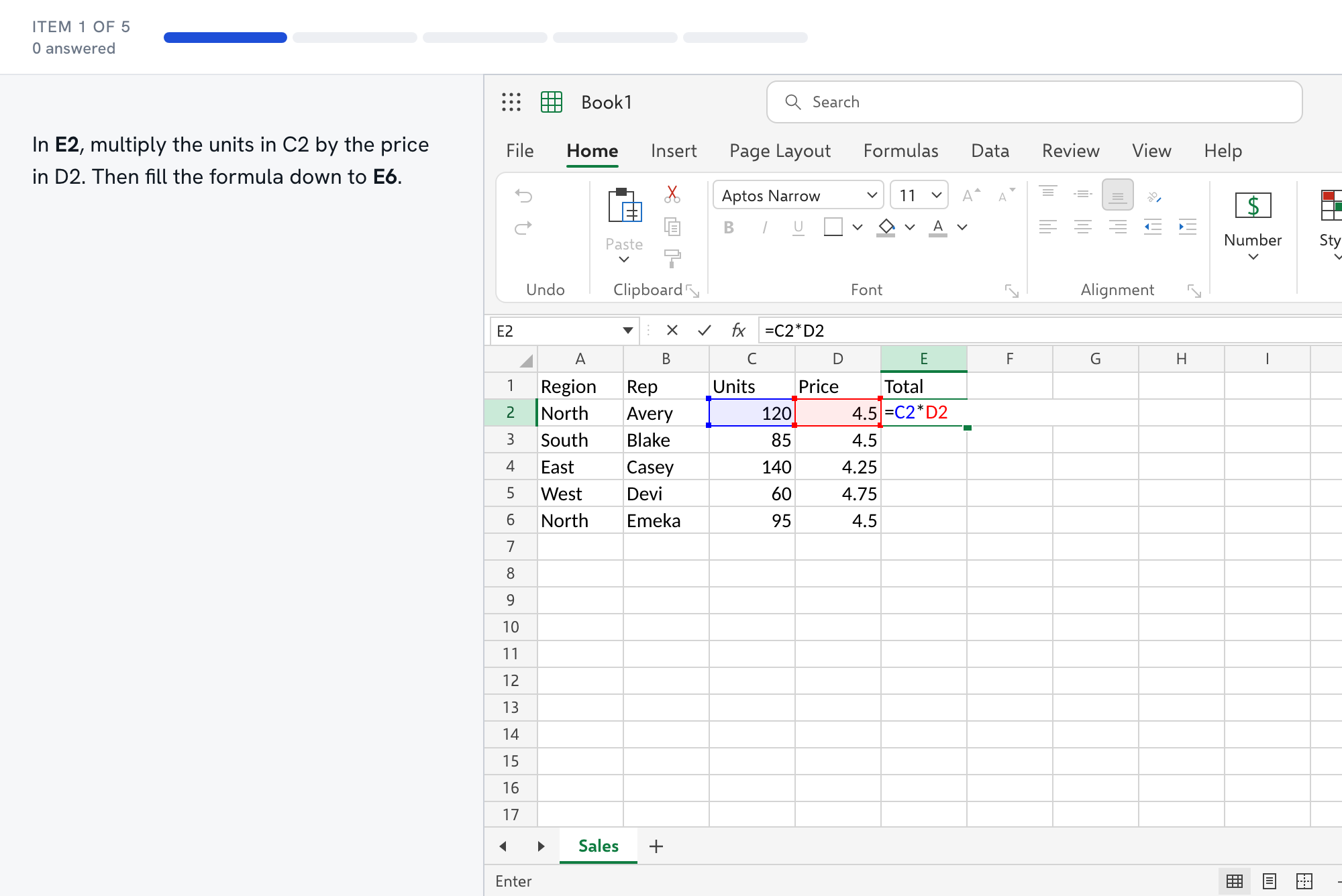
Questions about the Kenexa Prove It test
- Is the Prove It Excel test timed?
- SHL's catalog page for the Excel 2010 Normal User test does not state a time limit or a task count, so we cannot tell you either. Ask whoever sends the link. Our mock has no time limit on purpose, so you can build accuracy first, and the score report shows time per task so you can see where you slow down.
- What does the Normal User level cover?
- SHL describes it as building a basic workbook, formatting cells, navigating the application, using formulas, and changing the overall look of a spreadsheet. In our course that is mostly the free Excel from Zero track: The Grid, Editing and Selection, First Formulas, Core Functions, Formatting Basics, and Sort, Filter, Freeze.
- How should I work in a simulated spreadsheet?
- We cannot confirm what the real simulation accepts, so build habits that work anywhere: click the cell before you type, finish with Enter, and look at the cell afterward. In our grid the ribbon, the formula bar and common shortcuts such as Ctrl+C, Ctrl+Z, Ctrl+arrows and F2 all behave as they do in Windows Excel.
- Will retaking the mock give me the same tasks?
- No. A retake uses new numbers and a different mix of tasks from the same pool, so memorizing answers will not help. The skills carry over, which is the point.
- Is the sampler really free?
- Yes. It is five tasks, about ten minutes, with no account, and it ends with a skill-by-skill report. The full mock is part of Full Access.